UPDATE 2011-05-09: While some particularly stubborn fonts do require this process, users who have previously experienced difficulty with older versions of DfontSplitter should first try with DfontSplitter 0.3.1 or later, which include a possible fix for this issue.
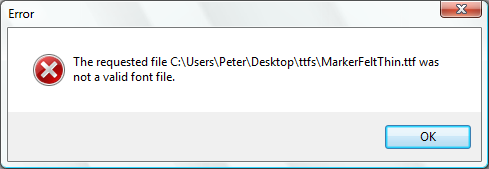
I think I’ve finally found a solution to this annoying error message that Windows gives when you use DfontSplitter to convert some fonts and then try and use those converted fonts in Windows.
It involves using a third-party open source application called FontForge to convert the TTFs that DfontSplitter gives you from a Mac-specific TTF format into ‘regular’ TTF format.
A full tutorial on using this method is included as a YouTube video screencast below.
If you can’t or don’t want to watch the video, essentially the process is:
- Use DfontSplitter on the .dfont file as normal
- Open the resulting TTF files you want in FontForge
- Export each TTF file from FontForge with File > Generate Fonts. Make sure TrueType format is selected.
- Import the resulting TTF files into Windows fonts folder.
Please do let me know if this process works for you and give any feedback — especially if you’d previously had problems using a .dfont you had wanted to use on Windows.

Well, I followed all of the steps to install cygwin with x11 and then fontforge, and to my surprise, it all worked beautifully. Great work, Peter.
Now I just have to iron out a few problems with some of the font families. For example, when I split and convert Neue Helvetica Light, it previews fine but QuarkXPress sees it as Light Italic. Any ideas?
Also, do you know of anyone using these fonts in a prepress environment? If so, did they have problems with embedded fonts once the documents got to the printer? Anyway, thanks for the great program and sorry for the long post.
Glad to hear that this solution worked out for you, gsoli — and thanks very much for getting in touch.
I don’t have the expertise to help you with either of your remaining questions and I certainly never envisioned that a program as relatively crude as DfontSplitter would help at all in a prepress environment! I’ll let you know if anyone else comes along who’s also working with the app in a more professional setting.
I tried out DFontSplitter to convert a .dfont to a ttf but instead I got about a dozen bdf files. I don’t know to much about fonts in general. I’m on a windows XP professional box…Any tips on how to get the ttf or otf files I need?
James,
In my experience you end up with a bunch of bdf and other files in addition to the TTF file that you’re looking for. Which specific font are you using — I’ll see if I can reproduce the behaviour.
Also, you’ll likely have to use FontForge as described in this post even after you get the TTF file out if you intend to use the font directly on Windows.
I used Dfont Splitter successfully in converting my AppleMac Dfont files into TrueType files. I had exactly the specified problem where windows xp would not open the TrueType files. I followed the instructions to install Cygwin etc…but to cut a long story short, I got lost in all the variables and gave up!
Instead I installed a trial 15 day download of a package called Crossfont…and managed to successfully convert all my NON opening Windows XP TrueType files, in to OPENING Windows XP truetype files! I have loaded them in to my PC’s fonts file so what were original Dfonts seems to work fine as TrueTypes in my Windows Xp based Design programs.
Granted, after 15 days I will have to buy a license for Crossfont…but i only needed it to get a load of Truetypes converted once.
Thanks for your efforts Peter -Dfont Splitter is very good to a point…it’s really the Cygwin get-around that’s too complex for a technical dunce like me!
Liked your explanatory video, you should seriously consider teaching if you dont do that already.
best regs, John
no offense, but if you have to use FontForge to fix these TTF files, there’s really no need for the Dfont Splitter application to begin with… FontForge will go straight from dfont to windows-compatible TTF’s.
evan,
I recognise that this whole Windows TTF versus Mac TTF business makes DfontSplitter a lot less useful. If I can find a solution that allows me to do that conversion within DfontSplitter, I will of course implement it straight away.
As it happens, DfontSplitter is merely a graphical program around some scripts that I didn’t write. Unfortunately, I don’t personally have a great understanding of the different font formats and how to manipulate them.
Is there a way to do these without having to install cygwin and related stuff? I really find that too much of a hassle for one font…
….Fontforge needs cyg11-6.dll, which is not within cygwin vers 1.7 8most recent), I tried everything – no way! There is no xinit in my X11 folder, which is necessary. Any Idea? Thx Andy
This was a great solution, so thanks for posting. I was wondering if you had a problem with Helvetica Bold on Windows. For some reason, when I transferred the four versions to the PC, it was just a copy of Helvetica regular. The Oblique and Bold Oblique are fine. When I view it on the Mac, there is a distinct difference between the bold and regular. It is very baffling.
Fiya,
I’ve had the same problem you describe with Helvetica Bold on Windows. Helvetica and Oblique work fine, but when you try to make some Helvetica text bold, it simply turns into Arial.
I don’t know what it is about Helvetica Bold and I’m afraid I don’t have a solution, but I do have the same issue.
Hi, I used FontForge directly in Linux (I have a vmware virtual linux box).
Unfortunately, as Evan said, with this solution there’s no need for DFontSplitter….
But I want to let you know FontForge showed this errors and this is maybe why DFontSplitter doesn’t work:
Error1:
The convention is tha TrueType fonts should have an em-size which is a power of 2. Bht this font has a size of 1000. This is not an error, but…
Error2:
The font conatins errors
Self Intersectiong
Wrong Direction
Missing Points at Exrema
BTW1: I had the same problem with fondu, but I think Dfontsplitters uses fondu…
BTW2: I had this problem converting Mac Helvetica, as others posted.
Alex Angelico,
Thanks for posting the errors you found. It’s useful to know the details of why these fonts might not work. Unfortunately it doesn’t bring me closer to a solution yet, but I appreciate you taking the time to post the information.
You’re right in that DfontSplitter uses fondu — any result you get with fondu should therefore exactly the same as the result you get from DfontSplitter.
Using http://www.freefontconverter.com/ worked for me without the hassle of downloading cygwin OR fontforge. It’s online too, so there is nothing to download. You just choose the mac .ttf file and it gives you a new win .ttf file to download.
I recognise that this whole Windows TTF versus Mac TTF business makes DfontSplitter a lot less useful. If I can find a solution that allows me to do that conversion within DfontSplitter, I will of course implement it straight away.
Why don’t you just look for a solution right inside of Font Forge? I’m sure you can do it from there…
– Spencer
SeaBlueAngelUni saves the day.
What a simple solution.
That cygwin crap was making my head pound.
Thank you.
http://peter.upfold.org.uk/blog/2009/08/23/dfontsplitter-solution-to-windows-corrupt-font-error/#comment-132715
I have an easier solution for this problem. Use dfont splitter in order to break apart the mac fonts, and then take the individual .ttf’s to http://www.freefontconverter.com/ and convert them into your format of choice. Even if you output it as a .ttf, the website outputs Windows compatible .ttf’s
Great program!
The issue is at “name” table. MAC fonts have only names with platformID=”1″ in it (i.e. “Mac”) and for Windows you need names with platformID=”3″ (i.e. “Windows”).
Furthermore, remeber to use correct platEncID value.
For platformID=”1″ the Encoding ID means
0 – Unicode 1.0 semantics
1 – Unicode 1.1 semantics
2 – ISO 10646 semantics
3 – Unicode 2.0 and onwards semantics, Unicode BMP only.
4 – Unicode 2.0 and onwards semantics, Unicode full repertoire.
For platformID=”3″ the Encoding ID means
0 – Symbol
1 – Unicode BMP (UCS-2)
2 – ShiftJIS
3 – PRC
4 – Big5
5 – Wansung
6 – Johab
10 – Unicode UCS-4
Sorry, for copying a part of standard, but is seems to me that you are using buck-passing instead of properly implementing standard in your application.
And “cmap” table has to be adjusted accordingly.
@Pavel
Thanks for this information.
I make clear on the More Info pages about DfontSplitter that my code is simply a graphical wrapper around the command line programs Fondu (which is written in C) and ttf2ttc (which are Perl scripts).
I would love to be able to offer a better solution and create compliant Windows-compatible TTFs, so this is something I will look into.
When I converted Helvetica plain from dfont to ttf, it became Helvetica oblique. Any thoughts on that? FontForge showed it as plain, but when I generated the ttf and clicked on the file, the style sheet that pulls up says “Helvetica CY Oblique”.
I have found an avenue to produce valid Windows true type fonts that does not give you all the errors described by Alex Angelico under “Error 2”
However, as Evan commented, sadly for Peter, it involves using FontForge straight from the dfont file without the need for DfontSplitter at all. Sorry Peter =S
The solution is basically the following:
1. Use FontForge to open the .dfont file as normal.
2. FontForge will prompt you asking for which version from the collection you would like to open (oblique, bold, etc.). Choose the one you’d like to convert.
3. Once open, export it to a TTC file (Yes, TTC not TTF) from FontForge with File > Generate TTC.
4. In general, with the TTC File, FontForge should not throw you any error or complaint (Potential exception with the warning of Em_size not being the power of 2 -which it’s not an error-).
5. In Windows 7, just right click the TCC file and choose Install. Voilà , you have now the font installed. Happy typing! Sincerely, S.T.
Thank you!
It worked! I thought I was stuck again after the Dfont splitter didn’t work, but with the fontforge it worked, though it did have some error messages about the font…
Thank you so much! This was truly helpful!
Now I finally have Helvetica on my computer 🙂
Any solution for WIndows 7? DfontSplitter can’t be installed.
This worked perfectly! You just saved me. I replaced my iMac with a PC and nearly had to reformat all the text in my resume to make it editable on my PC.
Thanks!!!
Hi Peter,
many thanks for DfontSplitter. It helped me converting a Mac dfont to a PC ttf. I am editing an InDesign file on Windows and need to go back to the Mac with it.
I needed to fix the bug of the converted ttf from DfontSplitter with FontForge > Generate Font > TTF (using default settings in Options).
Regards,
Gerrit