Keeping an eye on failed logins and the user accounts that are being targeted is an important part of being responsible for an Office 365/Azure Active Directory tenant.
If you can afford the higher-level O365/Azure AD plans, there are great tools built in to the Azure Portal that allow useful intelligence into your security posture.
For The Rest of Us(tm), we sometimes need to be a little creative to gather the information needed. For on-premises Active Directory Federation Services (ADFS) servers, I put together a simple, quick and, perhaps slightly hacky script to extract the usernames from recent failed login events from the Windows Event Log and dump them, along with the rest of the Windows Event, to a CSV file for later analysis.
This specifically searches event logs from the past 12 hours (43200000 milliseconds in the $query).
Note that this is heavily dependent upon the format of the event message having the username on the (zero-indexed) line 14. Works for us — no warranties, etc. etc.!
Installing the Remote System Administration Tools on a Windows 10 1903 system that uses System Center Configuration Manager to receive Windows updates seems to be challenging. The process of pulling the RSAT bits down from Windows Update in my experience was not succeeding – perhaps because the SCCM WSUS instance did not have them.
The CBS.log showed:
CBS Exec: Failed to download FOD from WU, retry onece. [HRESULT = 0x800f0954 - CBS_E_INVALID_WINDOWS_UPDATE_COUNT_WSUS]
Some solutions online seemed to suggest temporarily switching the Windows Update source in the registry to Windows Update (online) rather than WSUS, but editing the registry this way and upsetting the software update system seemed… unwise.
I ended up doing it a different way: downloading the Features on Demand DVD ISO from the Volume Licensing Service Center (in my case, SW_DVD9_NTRL_Win_10_1903_64Bit_MultiLang_FOD_1_X22-01658.ISO), mounting the ISO and using this modified version of Martin Bengtsson’s script to install the components from that ISO without contacting Windows Update.
I just released, on GitHub, IdleTaskTerminatorLite, my first foray into the lower-level world of programming directly with the Win32 API.
We use an old custom shutdown.exe (BeyondLogic Shutdown) to provide a timed screen lock feature, where a user is notified their screen will lock in a period of time and can cancel the locking of the workstation.
Clicking the Cancel button within the time limit, however, seems unnecessary and requires precisely clicking the Cancel button when the user is under time pressure! This is not a good user experience. A simple change to the idle state of the machine (any keypress or mouse movement) should cancel the timed locking of the workstation.
This lightweight background application detects user activity and forcibly kills the beyondlogic.shutdown.exe process, effectively cancelling the locking of the workstation without requiring the user to actually click Cancel.
This is currently rather ‘opinionated’ in that it specifically checks for hard-coded named processes running. It Works for Us(tm), but you may need to modify it for your environment. 😉
This whole solution is a little bit hacky, but it works. 😐
I had written something along these lines to terminate this workstation lock program in C#, but as a .NET process running in the background, you were looking at dozens of megabytes of RAM for something always running in the background. It felt thoroughly inefficient and unnecessary for something so simple.
I have always found myself honestly a little frightened of C and C++. Horror stories around coding securely, the undefined behaviour of doing ‘pointer stuff’ yourself… but this little project represented an opportunity to take this relatively rudimentary functionality and learn how to implement it the Win32 API directly in a C program — and in doing so, cut resource usage (hopefully) significantly.
So, I did. Using the oft-abused WH_KEYBOARD_LL hook (and its WH_MOUSE_LL cousin), I periodically update a counter as to the user’s last idle time. If the hook is called (i.e. the user is typing or moving the mouse) and it’s been long enough since we last noticed such interaction, I check for the beyondlogic.shutdown.exe process and, if present, kill it.
This began life as whatever Visual Studio template gave me a buildable project that let me work with the right APIs, so there is likely unnecessary stuff still present and it could be more lightweight still. And, there’s a good chance I’ve made mistakes that need correcting, so please do get in contact if you’re willing to educate me in some small (or large) way!
I have tried to be particularly careful with buffers — string handling is either done with (I guess, inefficient) fixed-size buffers where I check what I put in will fit first, and I’ve tried to use the ‘safe’ string functions where possible too.
So, it’s a baby step towards working on more low-level projects. But, I’ve taken some action to tackle my pointer anxiety. 🙂
Maybe next the whole program should do the workstation locking, warning message and idle detection in one program.
A recent upgrade to System Center Operations Manager, taking it to the new 2019 release, perhaps combined with an update to the Windows Server management packs, created an interesting issue.
On the management server, an alert was triggered about the management server itself:
Resolution State: New Alert: Server Service: File and Printer Sharing Ports Blocked Source: SCOM (SMB) Path: SCOM.fqdn Last modified by: System Last modified time: 3/13/2019 2:14:28 PM Alert description: Either Windows Firewall is disabled or the firewall inbound rules for TCP ports 445 or 139 are disabled.
Interesting. Did the upgrade to SCOM 2019 or the management pack somehow break Windows File Sharing? And if it did, why hadn’t we noticed more significant issues than just this alert?
Well, no — it looks like this alert is actually earlier from March, but perhaps the alert has re-surfaced, post upgrade, as the monitor re-evaluated. What I was sure about, however, was that the file sharing ports were indeed open and that this alert couldn’t be correct!
Right? Right?
To the Firewall!
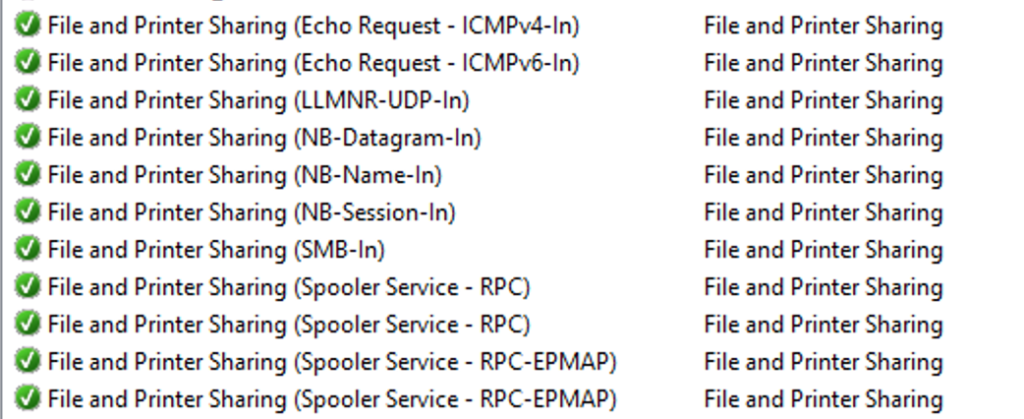
Investigating all the relevant firewall rules revealed that everything was in order — Windows File and Printer Sharing exceptions were allowed, as appropriate, across the board.
File and Printer Sharing rules
What is it Detecting?
So, it was time to dig a little deeper.
I was able to go to the Alert details and click on the Alert Monitor to drill down and find the details of how the monitor was coming to this apparently erroneous conclusion.
I extracted the script and tried running it manually on the server using cscript.
With a few WScript.Echo calls of mine sprinkled in, the relevant part of the VBScript that powered the monitor was as follows:
Dim rule

For Each rule in fwPolicy2.Rules
  If (rule.Protocol = NET_FW_IP_PROTOCOL_TCP) And (rule.LocalPorts = "445") Then
    WScript.Echo("Proto " + CStr(rule.Protocol) + " and port " + rule.LocalPorts + " enabled: " + CStr(rule.Enabled))
    WScript.Echo("rule.Profiles: " + CStr(rule.Profiles) + " and rule.Enabled " + CStr(rule.Enabled))

    If (Not rule.Enabled) And (rule.Profiles And fwCheckProfile )  Then

      WScript.Echo "Setting file sharing ports enabled to true"
      fwFileSharingPortsEnabled = "True"

      Exit For

    End If

  End If
Next
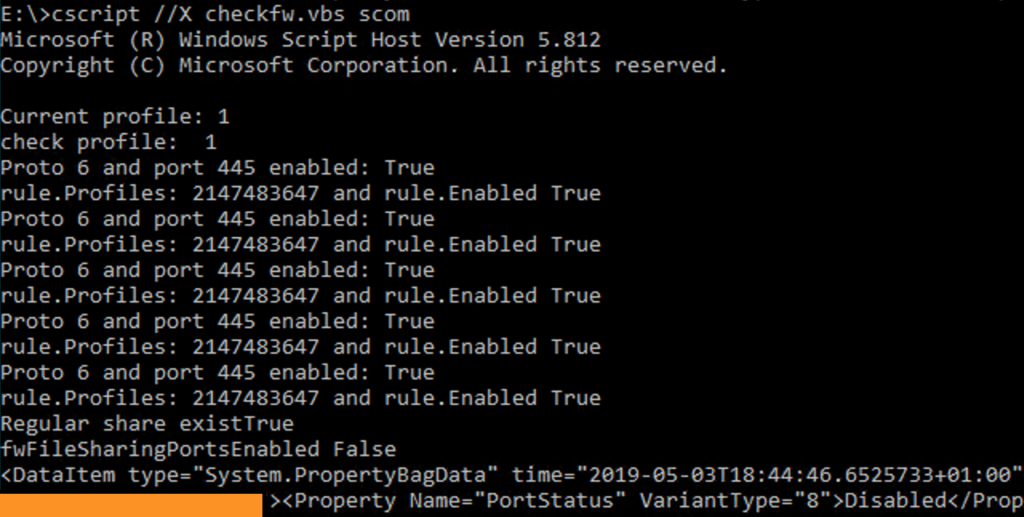
So, let’s go ahead and run this.
The script also checks to see if any non-hidden shares exist on the server and will only put the monitor in an unhealthy state if at least one exists.
It iterates over all the rules for port 445, decides all the rules are enabled, which would allow access to File Sharing, but then ends up with fwFileSharingPortsEnabled still being false.
This propagates to the ultimate script output of a PropertyBag with the value Disabled under PortStatus.
All the rules are enabled, but the result is that it considers the ports not open for business??
Is this Logic?
Is this Logic?
It seems to me that there is a logic error here:
If (Not rule.Enabled) And (rule.Profiles And fwCheckProfile ) Then
Only if the firewall rule is not enabled and the profile matches the current network profile, we consider the port enabled?
Remember that if the rule is not enabled, traffic would be blocked by the Windows Firewall.
It seems that this might be a simple logic error in the management pack. A comment later in the script even states:
‘ Only if regular share exists and port 139/445 are not open will portStatus be returned as “Disabled”
Am I missing something obvious?
I’d Report This…
I cannot figure out where I should report this, if I’m correct in thinking how this should be working. Should I complain on a forum? Is there a System Center Operations Manager support Short-Form “Bird” Social Media Site Before It Went Terrible profile? Product Support?
An Unorthodox Workaround
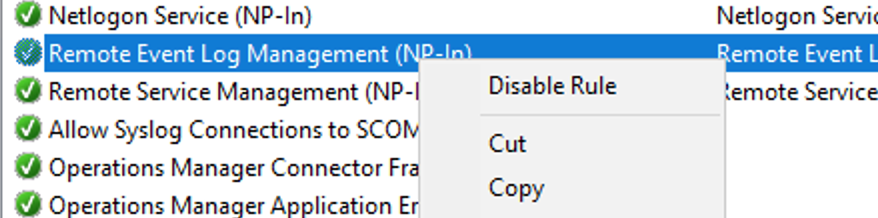
For now, disabling at least one of the rules for port 445 suppresses this alert. For example, if you don’t need or want Remote Event Log Management, you can disable the Remote Event Log Management (NP-In) rule. This script will then return Enabled and the alert will not be fired.
Any of the port 445 rules being disabled will cause the script to be happy again.
It sounds like an eminently sensible idea in world where failing to keep software up-to-date, in particular with security fixes, has a tangible negative impact on people. Treating software as a service also provides a healthy ongoing income stream, as well. 😉
So, naively, I am assuming that we couldn’t possibly quite as unlucky a second time, when testing using the same Windows 10 Servicing method for upgrading 1607 to 1703.
Alas, the upgrade to the new build itself worked without issue, but once booted into the new OS, Configuration Manager-mediated Windows Update scanning now fails.
This, from the WUAHandler.log:
OnSearchComplete - Failed to end search job. Error = 0x8024000d.

Scan failed with error = 0x8024000d.
Digging a little deeper, I’m seeing errors relating to the metadata for the updates.
[metadataintegrity] failed: hr = 0x80245004

[metadataintegrity]GetFragmentSigningConfig failed with 0x80245004. Using default enforcement mode: Audit.
We’re seeing an error relating to missing XML content, which I guess adds up with the suggestion that the metadata integrity is not validating.
0x8024000D WU_E_XML_MISSINGDATA Windows Update Agent could not find required information in the update's XML data.
My searching so farindicates that folks have fixed this with rather significant rebuilds of their WSUS infrastructure. I’d like to avoid that, of course!
It seems that perhaps third-party products being added to WSUS (such as Adobe Flash Player, before it was shipped as part of MS updates from Windows 8 onwards) may be related to the issue.
It is odd, and frustrating, that whatever issue it is only manifests in 1703, and that, once again, the nuclear option of a rebuild of a significant infrastructure piece is the dominant suggested solution.
I will update this post with any success I have resolving the issue without starting afresh with WSUS.
The march of freely available TLS certificates for domain validation continues in the form of the Let’s Encrypt project and I’m very pleased that it does.
I’m very happy with the Certbot client on most systems where I need to deploy Let’s Encrypt, but on hosts facing the big wide world that are Windows-based, Certbot obviously is not an option!
Fortunately, I’ve had success with the ACMESharp library for PowerShell. What’s cool about the library is that it does break down the process into individual commands, meaning you can automate, script and report on your certificate status with a great deal of flexibility.
For simpler scenarios, though, the letsencrypt-win-simple client offers a nice friendly command line interface to the ACMESharp library and is a nice easy way to quickly retrieve and install a Let’s Encrypt certificate on a public-facing IIS instance. Automating the renewal process is easy too — just create a Task Scheduler task.
Yes, it’s a command line client, and there are Windows folks who may not be comfortable with that, but it walks you through every part of the process. No memorising of switches and flags are needed!
There really is no excuse — now is the perfect time to get everything on HTTPS!
Even despite the dominance of webmail, I have long used a traditional desktop email client. I like having a local mail archive should “the cloud” have trouble, as well as the ability to exert control over the user interface and user experience. (That might be partly a euphemism for not having to see ads!)
Apple’s Mail.app built into macOS (going to have to get used to not calling it OS X!) has served me pretty well for quite some time now, alongside Thunderbird when I’m on Linux, and while Mail.app offered the most smooth interface for the platform, it didn’t always have all the features I wanted.
For example, being able to run mail rules is more limited than I wanted in Mail.app. I could have rules run automatically as messages arrived in my inbox, or disable them entirely. But actually how I wanted to use rules was to be able to cast my eye over my inbox, and then bulk archive (to a specific folder) all emails of a certain type if I’d decided none needed my fuller attention.
Recently, I moved to Thunderbird on my Mac for managing email and discovered QuickArchiver.
As well as letting you writing rules yourself, QuickArchiver offers the clever feature of learning which emails go where, and then suggesting the right folder to which that message can be archived with a single click.
It’s still early days, but I am enjoying this. Without spending time writing rules, I’m managing email as before, and QuickArchiver is learning in the background what rules should be offered. The extra column I’ve added to my Inbox is now starting to populate with that one-click link to archive the message to the correct folder!
It’s just a nice little add-on if, like me, you (still??) like to operate in this way with your email.
I haven’t said much about Windows 10 here on this blog, but my day job brings me into contact with it quite extensively.
There is a huge amount about the Windows experience that this release improves, but also there are elements of Microsoft’s new approach to developing and releasing it that are problematic.
The Good
Installing Windows 10 across a variety of devices, it is striking just how much less effort is required to source and install drivers. In fact, in most cases no effort is required at all! Aside from the occasional minor frustration of bloated drivers that are desperate to add startup applications, this makes such a positive difference. Unlike in the past, you can typically just install Windows, connect to a network, and everything will work.
This is particularly notable in any environment where you have a large number of devices with anything more than a little bit of hardware diversity. Previously in an enterprise environment, hunting for drivers, extracting the actual driver files, removing unwanted ‘helper application’ bits and building clean driver packages for deployment was tedious and wasteful of time. Now, much of the time, you let Windows Update take care of the drivers for you over the network, all running in parallel to the actual provisioning process that you have configured!
There are numerous other pockets of the operating system where there really feels like there has been a commitment to improve the user experience, but from my “world of work” experience of the OS, this is the most significant. It’s true as well that many of the criticisms you could make about past versions of Windows no longer apply.
The Bad
I guess that the coalescing of monthly Windows Updates into a single cumulative update helps significantly with the ‘236 updates’ problem with (and atrocious performance of) Windows Update in 7. However, Microsoft’s recent history of updates causing issues (the recent issues with KB3163622 and Group Policy, for example) combined with the inability to apply updates piecemeal leaves some IT departments reluctant to apply the monthly patch. The result, if Microsoft continues to experience these kind of issues, or doesn’t communicate clearly about backwards-incompatible changes, is more insecure systems, which hurts everybody.
This leads me to my other main complaint. There have been reports about the new approach Microsoft is taking with software testing. An army of ‘Insiders’ seem to be providing the bulk of the telemetry and feedback now, but my concern is that this testing feedback doesn’t necessarily end up being representative of the all of the very diverse groups of Windows users. Particularly when deploying Windows 10 in an Enterprise environment, it has felt at times like we are the beta testers! When one update is a problem, you then have to put people at risk by rejecting them all. 🙁
(Yes, there is LTSB, but it hangs back a very long way on features!)
The Ugly
At least you can turn it off on the login screen officially now. 🙂
In my recent trials and tribulations with ADFS 3.0, I came up against an issue where we were unable to host ADFS 3.0 with Nginx as one of the layers of reverse proxy (the closest layer to ADFS).
When a direct connection, or a cURL request, was made to the ADFS 3.0 endpoints from the machine running Nginx, all seemed well, but as soon as you actually tried to ferry requests through a proxy_pass statement, users were greeted with HTTP 502 or 503 errors.
The machine running ADFS was offering up no other web services — there was no IIS instance running, or anything like that. It had been configured correctly with a valid TLS certificate for the domain that was trusted by the certificate store on the Nginx machine.
It turns out that despite being the only HTTPS service offered on that machine through HTTP.sys, you need to explicitly configure which certificate to present by default. Apparently, requests that come via Nginx proxy_pass are missing something (the SNI negotiation?) that allows HTTP.sys to choose the correct certificate to present.
So, if and only if you are sure that ADFS is the only HTTPS service you are serving up on the inner machine, you can force the correct certificate to be presented by default, which resolves this issue and allows the Nginx reverse proxied requests to get through.
With that warning given, let’s jump in to what we need to do:
Retrieve the correct certificate hash and Application ID
netsh http show sslcert
You’ll need to note the appid and the certificate hash for your ADFS 3.0 service.
Set the certificate as the default for HTTP.sys
We’ll use netsh‘s interactive mode, as I wasn’t in the mood to figure out how to escape curly brackets on Windows’ command line!
You want the curly brackets literally around the appid, but not the certhash.
As with many other organisations, at my day job we are using the Office 365 service for email, contacts and calendars. There are a few ways to integrate 365 with your local Active Directory, and we have been using Active Directory Federation Services (ADFS) 3.0 for handling authentication: users don’t authenticate on an Office-branded page, but get redirected after entering their email addresses to enter their passwords on a page hosted at our organisation.
We also use the Azure AD Connect tool (formerly called Azure AD Sync, and called something else even before that) to sync the directory with the cloud, but this is only for syncing the directory information — we’re not functionally using password sync, which would allow people to authenticate at Microsoft’s end.
We recently experienced an issue where, suddenly, the endpoints for ADFS 3.0 that handle forms-based sign in (so, using a username and password, rather than Integrated Windows Authentication) were returning a HTTP 503 error. The day before, we had upgraded Azure AD Sync to the new Azure AD Connect, but our understanding was that this shouldn’t have a direct effect on ADFS.
On closer examination of the 503 issue, we would see errors such as this occurring in the AD FS logs:
There are no registered protocol handlers on path /adfs/ls/ to process the incoming request.
The way that the ADFS web service endpoints are exposed is through the HTTP.sys kernel-mode web serving component (yeah, it does sound rather crazy, doesn’t it) built into Windows.
One of the benefits of this rather odd approach is that multiple different HTTP serving applications (IIS, Web Application Proxy, etc.) can bind to the the same port and address, but be accessed via a URL prefix. It refers to these as ‘URL ACLs’.
To cut a very long story short, it emerged eventually that the URL ACLs that bind certain ADFS endpoints to HTTP.sys had become corrupted (perhaps in the process of uninstalling an even older version of Directory Sync). I’m not even sure they were corrupted in the purely technical sense of the word, but they certainly weren’t working right, as the error message above suggests!
Removing and re-adding the URL ACLs in HTTP.sys, granting permissions explicitly to the user account which is running the ‘Active Directory Federation Services’ Windows service allowed the endpoints to function again. Users would see our pretty login page again!
We repeated this process for other endpoints that were not succeeding and restarted the Active Directory Federation Services service.
Hurrah! Users can log in to their email again without having to be on site!
This was quite an interesting problem that had me delving rather deeply into how Windows serves HTTP content!
One of the primary frustrations when addressing this issue was that a lot of the documentation and Q&A online is for the older release of ADFS, rather than for ADFS 3.0! I hope, therefore, that this post might help save some of that frustration for others who run into this problem.
Isn’t it funny that so frequently it comes back to “turn it off, and turn it back on again”? 🙂
There used to be advertising here, but I no longer feel sure that advertising delivers the best experience and truly reflects the values of this site.
Keeping things running, however, is not without financial cost. If you would like to support the time and effort I have put into my tutorials and writing, please
consider making a donation.